

The rapid growth of the digital industry has increased the demand for websites, mobile applications, and online platforms. However, the success of a digital product is not determined by technology alone. An attractive interface, intuitive navigation, and a smooth user experience also play important roles.
This is where UI Design and UX Design have become essential fields for technology companies, startups, digital agencies, e-commerce businesses, and other organizations operating online.
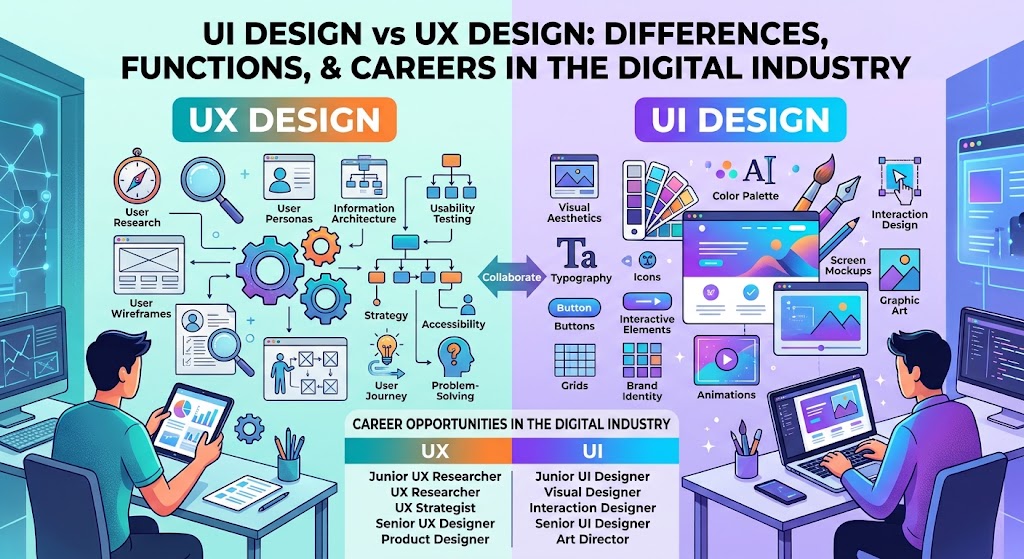
Although these two terms are often used together, UI Design and UX Design differ in their functions, workflows, and primary objectives. UI Design focuses on the visual appearance of a product, while UX Design focuses on the overall experience users have when interacting with it.
So, what is the difference between UI Design vs UX Design? What skills are required, and what career opportunities are available in these fields? This guide explores everything you need to know.
What Is UI Design?
UI Design stands for User Interface Design. It is the process of designing the interface people use to interact with websites, mobile applications, and other digital products.
A user interface includes visual and interactive elements such as buttons, icons, typography, colors, navigation menus, forms, and page layouts.
The primary goal of UI Design is to create an interface that looks appealing, feels consistent, and helps users understand how to interact with a product.
For example, when someone opens an online shopping application, they see a search bar, product categories, product images, prices, and buttons for adding items to a shopping cart. These visual and interactive elements are all part of UI Design.
UI Designers do more than make products look attractive. They must also ensure that each element has a clear purpose and helps users complete their tasks.
Main Responsibilities of a UI Designer
A UI Designer is generally responsible for:
- Designing website and mobile application interfaces.
- Choosing appropriate colors, typography, icons, and visual elements.
- Organizing page layouts so information is easy to read.
- Creating consistent interface components.
- Adapting designs to different screen sizes and devices.
- Preparing visual specifications and design assets for developers.
- Ensuring that interactive elements have clear and consistent states.
UI Design is important because the first impression can influence how users perceive a digital product. However, an attractive interface must also be easy to use to prevent confusion and frustration.
What Is UX Design?
UX Design stands for User Experience Design. It is the process of designing the overall experience people have when interacting with a product, service, or digital system.
Unlike UI Design, which primarily focuses on the interface, UX Design emphasizes users’ needs, behaviors, goals, and challenges.
UX Designers ask questions such as: Can users find information easily? Is the checkout process too complicated? Why do visitors leave a form before completing it? How can an application become easier to use?
To answer these questions, UX Designers often conduct user research, map user journeys, create wireframes, test prototypes, and evaluate usability.
For example, an online store may have an attractive interface, but customers might need to navigate through too many pages before completing a purchase. This is a user experience problem that UX Design can help address.
Main Responsibilities of a UX Designer
Common UX Designer responsibilities include:
- Conducting research to understand user needs.
- Analyzing user behavior and pain points.
- Developing user personas based on research findings.
- Mapping user journeys and navigation flows.
- Creating wireframes to plan page structures.
- Building prototypes to test design ideas.
- Conducting usability testing.
- Evaluating feedback and improving the user experience.
UX Design is not limited to visual appearance. It also involves research, analysis, human behavior, problem-solving, and collaboration with product and development teams.
UI Design vs UX Design: What Are the Differences?
The difference between UI Design and UX Design lies in their focus, methods, and intended outcomes.
UI Design aims to make interfaces visually appealing, clear, and consistent. UX Design aims to ensure that a product helps users accomplish their goals with as little friction as possible.
Here is a comparison of the two disciplines.
| Aspect | UI Design | UX Design |
|---|---|---|
| Primary focus | Interface appearance and interaction | Overall user experience |
| Main objective | Create attractive, understandable interfaces | Make products useful and easy to navigate |
| Typical activities | Designing colors, typography, buttons, icons, and layouts | User research, journey mapping, wireframing, and testing |
| Common methods | Visual design, design systems, and prototyping | User research, usability testing, and workflow analysis |
| Main deliverables | Interface designs and visual components | Research findings, user flows, wireframes, and recommendations |
| Key question | Is the interface clear and consistent? | Can users accomplish their goals easily? |
| Essential skills | Visual design and attention to detail | Research, analysis, empathy, and problem-solving |
Although they serve different purposes, UI Design and UX Design are closely connected. Both are necessary to create digital products that look appealing and provide a positive user experience.
Examples of UI Design and UX Design in Everyday Life
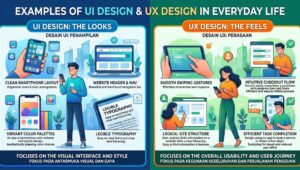
To better understand the difference, imagine that you are using an online shopping application to buy a pair of shoes.
1. The Role of UI Design in Shopping Apps
The UI Designer determines how products are presented to users. This includes choosing image sizes, fonts, button colors, price placement, and the layout of shipping information.
The goal is to make information easy to read and help users understand what actions they can take.
When the purchase button is clearly visible, product images are displayed effectively, and page layouts remain consistent, users can identify important information more easily.
2. The Role of UX Design in the Purchasing Process
The UX Designer considers the entire customer journey, from searching for shoes to completing payment.
They evaluate whether the search function works effectively, whether size filters are easy to find, whether shipping costs are transparent, and whether checkout requires too many steps.
If many customers abandon their purchases because they must provide unnecessary information, the UX Designer can investigate the problem and recommend a simpler checkout process.
3. How Do UI and UX Work Together?
The UI Designer ensures that payment buttons are easy to recognize and follow the application’s visual design system. The UX Designer ensures that the payment process is logical, straightforward, and requests only the information necessary to complete the transaction.
The result is an application that is not only visually appealing but also provides a more convenient shopping experience.
This example demonstrates that UI and UX have different responsibilities but work together to create high-quality digital products.
Why Is UI/UX Design Important for Digital Businesses?

UI/UX Design is not simply about aesthetics. Design quality can influence how customers understand a product, complete transactions, and perceive a business’s professionalism.
Here are several reasons why UI/UX Design matters.
Improving User Satisfaction
Websites and applications with clear navigation help users find information without wasting time. A convenient experience can also reduce the likelihood that users will abandon a product because they find it confusing.
Supporting Sales Conversions
For e-commerce businesses, product discovery, variant selection, and checkout should be designed carefully. A simpler purchasing journey can reduce friction and potentially improve conversion rates.
However, sales performance also depends on pricing, product quality, customer trust, marketing, and other factors.
Building Brand Trust
Consistent interfaces, clear information, and transparent transaction processes can create a professional impression. In contrast, inconsistent layouts or confusing forms may cause users to hesitate.
Reducing Product Rework Costs
Identifying usability problems through prototypes and user testing before full development can help teams reduce the risk of expensive changes after launch.
Improving Accessibility
Good design considers users with different abilities and needs. Examples include sufficient color contrast, readable text, clear form labels, and navigation that can be operated using a keyboard.
Popular UI/UX Design Tools
To work in UI/UX Design, you should become familiar with software that supports interface design, prototyping, collaboration, and usability testing.
Here are several tools worth exploring.
Figma
Figma is a popular tool for creating interface designs, interactive prototypes, reusable design components, and collaborative workflows. Its cloud-based environment allows team members to share and review work together.
Adobe Photoshop
Photoshop is widely used for image editing, visual asset creation, photo manipulation, and preparing graphic elements for digital projects.
Adobe Illustrator
Illustrator is useful for creating icons, illustrations, logos, and vector graphics that can be incorporated into website and application interfaces.
FigJam and Other Whiteboarding Tools
Whiteboarding tools help teams organize ideas, create user flow diagrams, map customer journeys, and discuss problems before moving into detailed design work.
Usability Testing and Analytics Tools
UX teams may also use specialized tools to conduct usability tests, analyze user behavior, collect survey responses, and gather feedback. The right choice depends on the product, budget, and research objectives.
Beginners do not need to master every application at once. Start with one primary design tool and learn additional software as your projects become more complex.
UI/UX Design Career Opportunities in the Digital Industry

Organizations that develop websites, mobile applications, SaaS platforms, financial technology services, and online stores need products that offer a good user experience. As a result, UI/UX Design can be an attractive career path for people interested in technology, design, and problem-solving.
However, career opportunities depend on more than industry trends. Skills, portfolio quality, project experience, communication, and employer requirements also influence a candidate’s prospects.
Here are several career paths related to UI/UX Design.
1. UI Designer
UI Designers focus on creating visual interfaces for websites and applications. This role is suitable for people who enjoy layouts, colors, typography, composition, and visual details.
2. UX Designer
UX Designers focus on user needs, research, interaction flows, and usability evaluation. This role may suit people who enjoy analyzing problems and developing effective solutions.
3. Product Designer
Product Designers often combine UI and UX responsibilities while considering business objectives and product strategy. Their responsibilities vary depending on the organization.
4. UX Researcher
UX Researchers study user behavior, needs, and challenges through interviews, surveys, observations, and other research methods. Their findings help product teams make better-informed decisions.
5. Interaction Designer
Interaction Designers focus on how users interact with digital products, including button responses, transitions, system feedback, and task flows.
6. Freelance UI/UX Designer
Designers can also work independently and offer services to clients. Projects may include landing pages, business websites, dashboards, mobile applications, and user experience improvements.
For freelancers, a strong portfolio is particularly important. Clients want to understand not only what the design looks like but also which problems it solves.
How Much Does a UI/UX Designer Earn?
UI/UX Designer salaries vary depending on location, experience, company type, responsibilities, and individual skills.
In general, junior designers tend to have more limited responsibilities than senior designers or design leads. Meanwhile, Product Designers at some companies may have broader responsibilities because they also contribute to product strategy.
To find realistic salary estimates, compare recent job listings in your target location. Pay attention to whether the figures represent base salary, total compensation, or project-based fees.
For freelancers, income also depends on the number of clients, project complexity, delivery timelines, and the ability to secure work consistently.
How to Start a UI/UX Design Career as a Beginner
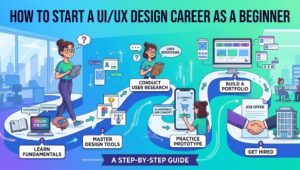
You do not need to become an expert designer immediately to begin learning UI/UX. The most important steps are understanding the fundamentals, practicing consistently, and building a portfolio that demonstrates your ability to solve problems.
Here is a practical learning path.
1. Learn the Fundamentals of Visual Design
Start with visual hierarchy, typography, color theory, spacing, composition, and design consistency. These fundamentals help you create interfaces that are easier to read and understand.
2. Understand UX Principles
Learn how to identify user needs, create user flows, develop wireframes, and conduct simple usability tests. Avoid designing entirely around personal assumptions.
3. Master One Design Tool
Figma is a useful starting point for learning interface design and prototyping. Practice by creating a login page, a simple dashboard, a product page, or a basic ordering application.
4. Build Practice Projects
Choose a real problem, such as a confusing food-ordering process or an online store with difficult navigation.
Define the problem, create a simpler user flow, design the interface, and ask a few people to test your prototype. Record the difficulties they experience and improve your design based on the findings.
5. Build a Portfolio
A strong portfolio should demonstrate more than the final visual design. Explain the original problem, user needs, design process, decisions, and testing results when available.
Do not invent research findings or conversion improvements. If a project is a personal exercise, clearly identify it as a self-initiated case study.
6. Develop Communication Skills
UI/UX Designers collaborate with developers, product managers, marketers, and other stakeholders. Being able to explain the reasoning behind design decisions is just as important as creating the design itself.
Which Is Better: UI Design or UX Design?
There is no single answer that works for everyone. UI Design and UX Design have different focuses and challenges.
If you enjoy visual elements, composition, colors, typography, and interface details, UI Design may be a suitable starting point.
If you are more interested in understanding user behavior, conducting research, mapping workflows, and solving usability problems, UX Design may be a better fit.
You do not have to choose one exclusively. Many designers learn the fundamentals of both fields before deciding on a specialization. Understanding both UI and UX can help you approach digital products more holistically.
Conclusion
UI Design vs UX Design is not a competition to determine which discipline is more important. Both serve different purposes and complement each other in digital product development.
UI Design focuses on interface appearance and visual interaction elements, while UX Design focuses on the user experience, from understanding user needs to evaluating how easily people can use a product.
For businesses, combining effective UI and UX can help create websites and applications that are clearer, more convenient, and better aligned with the goals of both users and organizations.
For beginners entering the digital industry, these fields offer several learning paths and career options. Start with design fundamentals, learn relevant tools, build practice projects, and develop a portfolio that demonstrates your problem-solving process.
With consistent practice and a solid understanding of the fundamentals, you can decide whether to pursue a career as a UI Designer, UX Designer, Product Designer, or another digital design specialist.
Frequently Asked Questions About UI Design and UX Design
What is the main difference between UI Design and UX Design?
UI Design focuses on the appearance and interactive elements of a digital product, while UX Design focuses on the overall experience users have when using that product.
Do UI Designers need to know how to code?
Not necessarily. UI Designers generally focus on interface design and visual specifications. However, a basic understanding of HTML, CSS, or application development can improve collaboration with developers.
Do UX Designers need graphic design skills?
UX Designers do not have to be graphic design experts, but they should understand basic interface design principles so that their proposed solutions can be communicated and implemented effectively.
Which tools are best for learning UI/UX Design?
Figma is a useful option for beginners because it supports interface design, prototyping, and collaboration. Additional research and testing tools can be introduced as needed.
Are there career opportunities in UI/UX Design?
Opportunities exist across technology companies, digital agencies, e-commerce businesses, startups, and organizations that develop digital products. Actual opportunities depend on market demand, experience, skills, and portfolio quality.
Can beginners become freelance UI/UX Designers?
Yes. Beginners can start with smaller projects and gradually develop their portfolios. Before offering services widely, make sure you understand client requirements, can explain your workflow, and can deliver projects according to agreed expectations.